

Table of Contents
- Quick Comparison Table of DJI Osmo Mobile 6 vs DJI Osmo Mobile 7P
- In-Depth DJI Osmo Mobile 6 vs DJI Osmo Mobile 7P Review
- 1. Deployment
- DJI Osmo Mobile 6
- DJI Osmo Mobile 7P
- 2. Design and Build Quality
- DJI Osmo Mobile 6
- DJI Osmo Mobile 7P
- 3. Weight and Payload Capacity
- DJI Osmo Mobile 6
- DJI Osmo Mobile 7P
- 4. Battery Life
- DJI Osmo Mobile 6
- DJI Osmo Mobile 7P
- 5. Ease of Use
- DJI Osmo Mobile 6
- DJI Osmo Mobile 7P
- 6. In-App Tracking
- DJI Osmo Mobile 6
- DJI Osmo Mobile 7P
- 7. Range of Motion
- DJI Osmo Mobile 6
- DJI Osmo Mobile 7P
- 8. Fill Lights
- DJI Osmo Mobile 6
- DJI Osmo Mobile 7P
- 9. Audio Integration
- DJI Osmo Mobile 6
- DJI Osmo Mobile 7P
- 10. Companion Apps
- DJI Osmo Mobile 6
- DJI Osmo Mobile 7P
- Limitations of the DJI Osmo Mobile 6 vs DJI Osmo Mobile 7P
- DJI Osmo Mobile 6
- DJI Osmo Mobile 7P
- DJI Osmo Mobile 6 vs DJI Osmo Mobile 7P: Which is Better?
- Final Words
- FAQs
- 1. Should you upgrade from DJI Osmo Mobile 6 to DJI Osmo Mobile 7P?
- 2. What’s the main difference between DJI Osmo Mobile 6 vs DJI Osmo Mobile 7P?
- 3. What does the DJI Osmo Mobile 7P multifunction module give you?
- 4. How do tripod and extension options differ on Osmo Mobile 6 vs 7P?
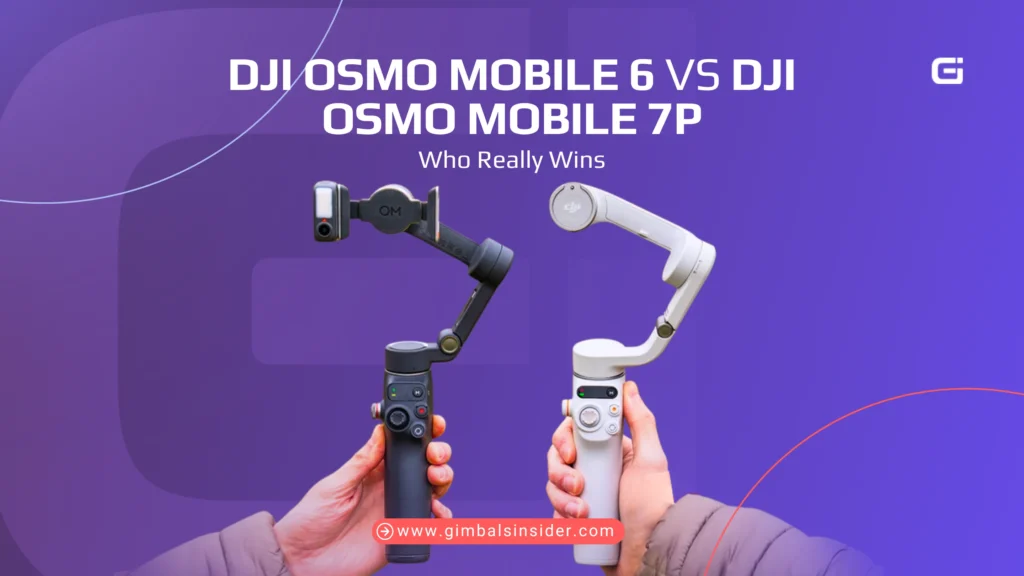
For a long time, the DJI Osmo Mobile 6 was the default pick for most gimbal lovers. Then the Osmo Mobile 7P showed up and a lot of us started wondering if it was time to switch. So, should you stick with the Osmo 6 or move to the 7P?
- Osmo Mobile 6 is better suited for lighter setups due to its screw-on tripod, smaller grip, 6.5-hour battery, and app-only ActiveTrack.
- Osmo Mobile 7P stays ahead with a built-in tripod, 10h and power-bank style battery, stronger grip, module-based tracking, and an LED fill light that works in any app.
In this DJI Osmo Mobile 6 vs DJI Osmo Mobile 7P breakdown, I’ll show you how each one feels in real use. By the end, you’ll know which one earns a spot in your bag.
Quick Comparison Table of DJI Osmo Mobile 6 vs DJI Osmo Mobile 7P
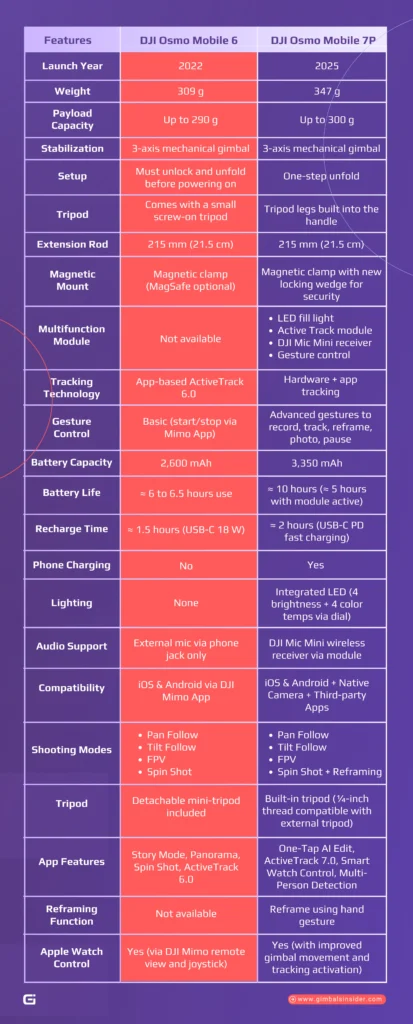
If you make videos and are trying to pick between the Osmo Mobile 6 and the new Osmo Mobile 7P, this table makes it easy to see what’s different and what actually matters.
| Features | DJI Osmo Mobile 6 | DJI Osmo Mobile 7P |
| Launch Year | 2022 | 2025 |
| Weight | 309 g | 347 g |
| Payload Capacity | Up to 290 g | Up to 300 g |
| Stabilization | 3-axis mechanical gimbal | 3-axis mechanical gimbal |
| Setup | Must unlock and unfold before powering on | One-step unfold |
| Tripod | Comes with a small screw-on tripod | Tripod legs built into the handle |
| Extension Rod | 215 mm (21.5 cm) | 215 mm (21.5 cm) |
| Magnetic Mount | Magnetic clamp (MagSafe optional) | Magnetic clamp with new locking wedge for security |
| Multifunction Module | Not available | LED fill lightActive Track moduleDJI Mic Mini receiverGesture control |
| Tracking Technology | App-based ActiveTrack 6.0 | Hardware + app tracking |
| Gesture Control | Basic (start/stop via Mimo App) | Advanced gestures to record, track, reframe, photo, pause |
| Reframing Function | Not available | Reframe using hand gesture |
| Apple Watch Control | Yes (via DJI Mimo remote view and joystick) | Yes (with improved gimbal movement and tracking activation) |
| Battery Capacity | 2,600 mAh | 3,350 mAh |
| Battery Life | ≈ 6 to 6.5 hours use | ≈ 10 hours (≈ 5 hours with module active) |
| Recharge Time | ≈ 1.5 hours (USB-C 18 W) | ≈ 2 hours (USB-C PD fast charging) |
| Phone Charging | No | Yes |
| Lighting | None | Integrated LED (4 brightness + 4 color temps via dial) |
| Audio Support | External mic via phone jack only | DJI Mic Mini wireless receiver via module |
| Compatibility | iOS & Android via DJI Mimo App | iOS & Android + Native Camera + Third-party Apps |
| Shooting Modes | Pan FollowTilt FollowFPVSpin Shot | Pan FollowTilt FollowFPVSpin Shot + Reframing |
| Tripod | Detachable mini-tripod included | Built-in tripod (¼-inch thread compatible with external tripod) |
| App Features | Story Mode, Panorama, Spin Shot, ActiveTrack 6.0 | One-Tap AI Edit, ActiveTrack 7.0, Smart Watch Control, Multi-Person Detection |
In-Depth DJI Osmo Mobile 6 vs DJI Osmo Mobile 7P Review
There are some major differences I found while doing the reviews DJI Osmo Mobile 6 vs DJI Osmo Mobile 7P. Let’s get into them one by one.
1. Deployment
How quickly your gimbal unfolds, powers up, and packs away can decide whether you capture or miss an outstanding shot.
DJI Osmo Mobile 6
The Osmo Mobile 6 keeps things compact and reliable. You unfold the hinge, snap your phone onto the magnetic mount, and it self-balances in seconds. But there’s still a bit of manual setup of unlocking and aligning the arm before filming.
It’s not slow, but you’ll notice the extra steps when you’re on the move.
DJI Osmo Mobile 7P
The 7P takes that same idea and makes it faster. Just flip it open and the gimbal powers on, balances, and is ready to film. You don’t need to unlock like Osmo 6.
Even better, you can fold it down with your phone clamp still attached. So the setup and teardown take seconds.
2. Design and Build Quality
Let’s look at how both models are built, how they handle, and what makes them different.
DJI Osmo Mobile 6
The OM 6 still feels like one of DJI’s most dependable smartphone gimbals. It’s compact, folds up cleanly, and slips easily into a jacket pocket or camera bag.
Plus, its hinge and overall build feel sturdy, not cheap. Also, the small screw-on tripod adds extra stability when you’re filming yourself.
DJI Osmo Mobile 7P
With the 7P, DJI clearly listened to creators who wanted faster setup and more built-in tools. It comes with an integrated tripod, along with a slightly longer handle that lets it feel better balanced and easier to grip.
3. Weight and Payload Capacity
If you film often, weight and balance matter more than you think. The Osmo Mobile 6 and 7P look close, but how they handle and what they can carry tell two different stories.
DJI Osmo Mobile 6
It weighs about 305 grams. So, it’s light, easy to carry, and quick to set up. However, it can still handle most smartphones well, even big ones with cases.
In use, it feels steady but not heavy, which helps if you shoot handheld for long stretches. It’s a good fit for vloggers or creators who move a lot and just want something simple that works.
DJI Osmo Mobile 7P
Durinig DJI Osmo Mobile 7P review, I noticed that it’s slightly heavier, weighing around 343 grams. But this extra weight provides added grip and power. Besides, 7P’s motors are stronger, so they can hold phones with ND filters, SSDs, or lens add-ons without strain.
The new phone clamp also grips better, especially for larger phones. It still packs small, but it feels more solid in hand, built for longer shoots and heavier gear.
4. Battery Life
When you’re filming outside or moving between spots, battery life often decides how long you can keep creating. Let’s see what each gimbal has got.
DJI Osmo Mobile 6
The Osmo Mobile 6 has a 2600 mAh battery that lasts around six hours. That’s fine for short vlogs or a few travel clips, but not ideal for long recording days.
However, you can’t charge your phone from it either, so once it’s out, you stop shooting.
DJI Osmo Mobile 7P
The Osmo Mobile 7P steps up to a 3350 mAh battery. Thus, it can last close to ten hours in regular use. You can also plug your phone into it for charging while recording, which helps a lot during long shoots.
But using the multifunction module or the LED light drains it faster, down to about five hours.
5. Ease of Use
Choosing between the Osmo Mobile 6 and 7P comes down to how simple they feel to use when you’re out filming. Specs matter, but comfort and speed matter more.
DJI Osmo Mobile 6
The Osmo Mobile 6 is made for quick setup and easy control. You unfold it, clip your phone, and it’s ready. The magnetic mount is strong, and the gimbal balances itself without much effort.
And gladly, the buttons and joystick are right where you expect them.
DJI Osmo Mobile 7P
The 7P keeps what works from the 6 but makes it faster to use. As already mentioned, it powers on the moment you unfold it and balances automatically.
The built-in tripod legs save you from carrying extra gear, and the longer handle feels steadier in your hand.
6. In-App Tracking
Both can handle tracking and steady your shots well, but the way they track your subject feels very different.
DJI Osmo Mobile 6
The Osmo Mobile 6 gives you reliable 3-axis stabilization and clean tracking through the DJI Mimo app. Its ActiveTrack 6.0 keeps people or pets centered as you move.
The only catch is that it works only inside the Mimo app. Therefore, you can’t use it with your phone’s native camera or apps like TikTok or Instagram.
DJI Osmo Mobile 7P
The Osmo Mobile 7P takes a clear step forward with ActiveTrack 7.0 and a magnetic add-on called the Multifunction Module.
It lets the gimbal track without using the Mimo app. Thus, you can film with your phone’s main camera app, record in Apple ProRes, or stream live while still being tracked. The module also adds gesture controls, a light, and a mic connection.
7. Range of Motion
When you compare the Osmo Mobile 6 and 7P, the difference shows up in how far each gimbal can move and how steady they stay.
DJI Osmo Mobile 6
The Osmo Mobile 6 has 3-axis stabilization that keeps the video level while walking or doing light moves. It can rotate about 180 degrees, which works fine for most shots. But if you try faster pans or wider angles, it can feel a bit limited.
DJI Osmo Mobile 7P
The Osmo Mobile 7P takes that motion a step further with around 280 degrees of pan range. Thus, it can handle bigger camera moves and faster subjects without breaking the horizon line.
Moreover, the seventh-gen stabilization reacts quicker when you change direction. Besides, its ActiveTrack 7.0 keeps you in frame to give you more freedom to move and still get that professional look.
8. Fill Lights
Here’s a simple look at how the Osmo Mobile 6 and 7P handle fill lights so you can decide what fits your workflow.
DJI Osmo Mobile 6
The Osmo Mobile 6 doesn’t have a built-in light. If you shoot in low light, you’ll need a small external light or a phone-mounted one. The MIMO app gives you exposure control but no option to tweak brightness or color warmth.
On the upside, the battery lasts longer since no light draws power. So, it’s reliable in daylight, but for night clips or indoor shoots, bring your own light.
DJI Osmo Mobile 7P
With its magnetic multifunction module, there is an LED light next to the tracking sensor. You can turn it on by pressing the side wheel and adjust brightness or color tone from cool to warm. It’s useful for late shoots or dim rooms.
Though the light isn’t super bright and can cut into battery time, especially when using ActiveTrack or Apple ProRes.
9. Audio Integration
If you shoot video often, sound quality matters as much as stable footage. The Osmo Mobile 6 and 7P handle this part very differently, and that difference can affect how you record every day.
DJI Osmo Mobile 6
Well, it gave solid stabilization and an easy setup, but audio was left to your phone or an external mic. There was no built-in way to connect wireless audio or manage sound through the gimbal itself.
It worked great with the DJI Mimo app and ActiveTrack 6.0, but creators still had to carry separate gear for good sound.
DJI Osmo Mobile 7P
The Osmo Mobile 7P fixes that gap. Again, thanks to the small Multifunction Module as it also works as a receiver for the DJI Mic Mini. You can connect your mic directly and record clean wireless audio without extra cables.
LED lights show when you’re linked, and it still works with the iPhone’s native camera app for Apple ProRes recording.
10. Companion Apps
For people who shoot often, the real difference between these two gimbals isn’t just what they do in your hand. It’s how the apps change the way you film and edit.
DJI Osmo Mobile 6
It works through the DJI Mimo app, where you control tracking, shooting modes, and editing tools. It includes ActiveTrack 6.0, Story Mode, gesture control, and quick AI edits.
The app makes it simple for solo shooters to record steadily without much setup. But the controls only work inside the Mimo app. Thus, you can’t use advanced tracking with your phone’s native camera or other apps.
DJI Osmo Mobile 7P
7P goes further with its Multifunction Module, which runs ActiveTrack 7.0 without needing the app. You can film in Apple ProRes, Blackmagic Camera, or social apps like Instagram and still keep subject tracking active.
When you do open the Mimo app, you get more fine-tuned tools like reframing, gesture edits, and AI auto-cut videos.
Read More: Best Gimbal for Sony A7iii?
Limitations of the DJI Osmo Mobile 6 vs DJI Osmo Mobile 7P
Both DJI Osmo Mobile 6 vs DJI Osmo Mobile 7P specs can seriously level up your smartphone footage, but neither is perfect. Here’s where each of them lacks —
DJI Osmo Mobile 6
The Osmo Mobile 6 still delivers smooth, professional-looking video, but compared to the 7P it’s starting to show its age. Here’s where its design and feature set can hold creators back.
- ActiveTrack 6.0 is great, but you only get it through the DJI Mimo app. You can’t use that sticky tracking with the native camera, FaceTime, Instagram, TikTok, or Blackmagic.
- The Osmo Mobile 6 doesn’t support the new Multifunction Module. That means no standalone tracking sensor on the clamp, no gesture control that works in any app, and no tracking when you’re shooting Apple ProRes.
- To use the Osmo 6, you have to unlock the gimbal head, unfold the arm, attach the magnetic clamp, and screw on the tripod if you need it. When you’re done, you must remove the clamp to fold it down.
- The Osmo Mobile 6 relies on a separate screw-on tripod accessory for standing shots. It works, but it’s one more piece to carry, forget, or lose, and adds time every time you want to set the gimbal down.
- It pans roughly 180°, so it hits its limits sooner when tracking you as you move around or when you try more creative “wrap-around” shots.
- While you can mount large phones, the Osmo 6 clamp and payload are less capable with bulky cases, ND filters, or SSDs.
- For zoom, mode switching, and some controls to work properly, you need to be in the DJI Mimo app.
- With around six to six and a half hours of runtime, the Osmo 6 drains faster than the 7P.
DJI Osmo Mobile 7P
Osmo Mobile 7P fixes many of the pain points from the 6, but it also brings a new set of trade-offs.
- Though rated time is about 10 hours, battery life drops fast with the Multifunction Module. Turn on ActiveTrack, use the LED light, or charge your phone, and real use can fall to around 4 to 6 hours.
- The Multifunction Module only tracks people. It can struggle at long distances, with busy backgrounds, or when several people cross in front of each other.
- Sometimes it can miss or misread hand signs to start or stop tracking or recording can miss or misread. DJI Mimo may also turn gestures off after some idle time to save battery.
- The built-in receiver only pairs with DJI Mic Mini. Other wireless mics, including the DJI Mic 2 and many popular third-party kits, cannot connect directly.
- The fold out tripod legs in the base are handy but short and plastic. On uneven ground, in the wind, or with the extension rod raised, they can feel risky.
- The built-in tripod and longer body also add about 38 grams compared to the older setup without a tripod. It is not huge, but during long handheld sessions, you may feel the extra weight and length in your wrist.
- On iPhone, you grab DJI Mimo from the App Store. On many Android phones, you need to sideload the APK from DJI. Some users won’t be comfortable with the update and security side of that.
DJI Osmo Mobile 6 vs DJI Osmo Mobile 7P: Which is Better?
If you mostly shoot vlogs, social media clips, or vacation shots on your phone, the Osmo Mobile 6 is still a highlight. You get a simple setup, three-axis stabilization, solid ActiveTrack, and a compact smartphone gimbal that just works.
Then again, pick the Osmo Mobile 7P if you treat your phone like a serious camera. It lets you record Apple ProRes in the native camera app, use the multifunction module for tracking, light, and Mic Mini support.
With longer battery life and phone charging, it fits solo videographers and fast run-and-gun shoots.
Interesting Read: DJI Osmo Mobile 7P vs Insta360 Flow 2 Pro
Final Words
So, when you stack up the DJI Osmo Mobile 6 vs DJI Osmo Mobile 7P, it really depends on how you shoot.
If you’re after something lightweight and easy for daily vlogs or travel clips, the Osmo Mobile 6 still nails it. But if you treat your phone like a full camera rig, the 7P is the clear upgrade. You get longer battery life, built-in tripod legs, the Multifunction Module, and tracking that works outside the Mimo app.
I’d suggest that you first think about how you film, not just what’s new. Match your workflow first, and then specs.
FAQs
1. Should you upgrade from DJI Osmo Mobile 6 to DJI Osmo Mobile 7P?
You should upgrade to DJI Osmo Mobile 7P if you want longer battery life, a built-in tripod, on-the-go phone charging, and tracking that works outside the Mimo app. If your Mobile 6 already covers your shoots, stabilization stays very similar.
2. What’s the main difference between DJI Osmo Mobile 6 vs DJI Osmo Mobile 7P?
DJI Osmo Mobile 7P keeps the same 3-axis stabilization. However, it adds a built-in tripod, a longer 10 h battery, phone charging, a wider pan range, and a multifunction module. Osmo Mobile 6 is lighter, cheaper, and more basic in comparison.
3. What does the DJI Osmo Mobile 7P multifunction module give you?
The 7P multifunction module adds an LED fill light, gesture and subject tracking that works in any camera app, and acts as a receiver for DJI Mic Mini so you can record cleaner audio straight into native or third-party camera apps.
4. How do tripod and extension options differ on Osmo Mobile 6 vs 7P?
Osmo Mobile 6 has a screw-on tripod plus a built-in extension rod. DJI Osmo Mobile 7P keeps the extension rod but adds fold-out tripod legs in the handle so you can drop it down and shoot faster without.



Leave A Reply
Comment submitted successfully!