

Table of Contents
- Key Takeaways
- So, Can You Use Gimbal Without Tripod?
- When Should You Use a Tripod with a Gimbal?
- For Locked-Down Shots in a Hybrid Shoot
- To Achieve Perfectly Stable Low-Angle Shots
- When Your Gimbal Needs a Rest
- To Prevent Gimbal Drift and Maintain Framing
- When You Shouldn’t Use a Tripod with a Gimbal
- Common Mistakes When Using a Gimbal Without a Tripod
- Final Words
- FAQs
- Is a gimbal better than a tripod for video?
- Why do gimbals come with small tripods?
- What’s the best way to stabilize a gimbal without a tripod?
You’ve got a gimbal, but do you really need a tripod to keep it steady? Most creators struggle with that same question. And mostly end up overpacking or overspending. So, can you use gimbal without tripod?
Yes, you can use a gimbal without a tripod. Its built-in motors keep footage steady, so a tripod isn’t needed for most filming situations like vlogs, travel videos, or action scenes. However, you should use a tripod only for still shots like interviews, time-lapses, or long exposures.
Moving forward, I’ll show you when to skip the tripod, when to use it, and how to get pro-level stability wherever you shoot.
Key Takeaways
- Gimbals are built to stabilize motion, so you don’t need a tripod for most handheld or moving shots.
- Use a tripod with your gimbal when you need locked-down stability. It’s perfect for sit-down interviews, time-lapses, product demos, or low-angle shots that require precision.
- Skip the tripod when you need to stay mobile. For tight spaces, creative walkthroughs, or action clips, holding your gimbal keeps your shots natural.
So, Can You Use Gimbal Without Tripod?
Yes, you can definitely use a gimbal without a tripod. A gimbal’s internal motors actively stabilize your camera to make a tripod unnecessary for active, on-the-go filming. That’s why you don’t need a tripod for most on-the-go filming.
That said, when you’re shooting still scenes, like sit-down interviews, product showcases, or long-exposure photography, a tripod is still the better choice. It provides the locked-in stability that no gimbal can fully replicate.
Ultimately, your choice depends on your creative vision.
When Should You Use a Tripod with a Gimbal?
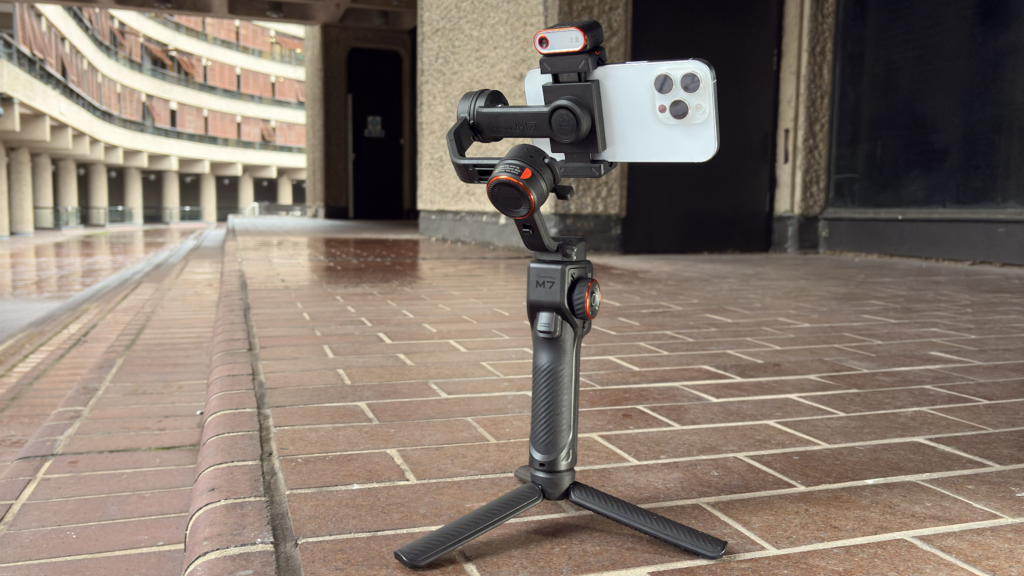
When you pair a gimbal with a tripod, it can give you exclusive creative options.
For Locked-Down Shots in a Hybrid Shoot
Let’s say you’re shooting an interview, time-lapse, or product shot, and you also need to capture a few motion clips right after. In that case, mounting your gimbal on a tripod keeps your camera rock-solid for the static part.
Then, when it’s time to move, you can detach and start filming handheld in seconds. It’s fast, keeps your footage looking consistent, and is a smart technique often recommended in guides on how to film social media content with gimbal where speed and flexibility really matter.
To Achieve Perfectly Stable Low-Angle Shots
Trying to hold a gimbal at ground level is tough and rarely steady. A tripod lets you position your gimbal at the exact low height you need without shaking or fatigue.
This setup is great for dramatic, cinematic angles or creative perspectives that demand precision and stability.
When Your Gimbal Needs a Rest
Gimbals get heavy over time, and those motors drain batteries faster than you’d expect. So, when you mount it on a tripod, it gives you a moment to rest and helps conserve power. It makes a big difference during long shoots or when you’re waiting for that perfect shot.
To Prevent Gimbal Drift and Maintain Framing
Even high-end gimbals can drift slightly over time. If you’re holding a static composition, like filming a subject for more than a minute, that minor movement can ruin the shot.
And that’s when setting the gimbal on a tripod locks everything in place to keep your framing exact.
Read Also: Can You Put a Gimbal on a Tripod?
When You Shouldn’t Use a Tripod with a Gimbal
Sometimes, adding a tripod to your gimbal setup can actually hold you back. So, here’s when it’s best to leave the tripod behind —
- When You’re Filming On the Move: If you’re walking through a market, chasing a sunset, or filming a travel vlog, holding your gimbal lets your shots flow naturally. The moment you mount it on a tripod, that movement dies.
- When You Need to React Fast: In fast-changing scenes, like street filming, travel moments, or live events, setting up a tripod wastes valuable seconds. Holding your gimbal lets you adjust instantly to changing angles or lighting.
- When Portability Matters Most: Tripods can add bulk to your kit. If you’re hiking, shooting while traveling, or carrying gear all day, skipping the tripod keeps your setup light and flexible.
- When You’re Shooting Tight or Crowded Spaces: In festivals or narrow alleys, a tripod takes up space and blocks people. Using your gimbal handheld keeps you flexible and respectful of your surroundings.
- When You Want Dynamic Movement: A gimbal’s real strength is its ability to glide with you, like following a subject, panning naturally, or weaving through a scene. Mounting it on a tripod removes that fluid motion and turns it into a static stabilizer.
Common Mistakes When Using a Gimbal Without a Tripod
Even with the best gimbal, it’s easy to make small mistakes that mess up smooth footage. I’ve seen it happen a lot, especially when shooting handheld without a tripod.
Here’s what you’ll want to watch out for —
- Relying too much on the gimbal’s motors: The gimbal can stabilize motion, but it can’t fix poor handling. So, keep your movements slow and deliberate.
- Skipping calibration: Always calibrate before a shoot. It only takes a minute and saves you from drifting horizons, tilted frames, or unnecessary motor strain.
- Overloading your setup: If your camera and lens are heavier than the gimbal’s payload limit, your shots will wobble and your battery will drain faster.
- Ignoring your posture and fatigue: Handheld shooting takes a toll. Keep your elbows close, bend your knees slightly, and use your legs for movement instead of your wrists. When your arms start to burn, take a quick break.
Final Words
When it comes to the question of whether can you use gimbal without tripod, the answer is yes. Most of the time, that’s exactly how it’s meant to be used. A gimbal excels when you’re moving, chasing moments, or telling stories on the go.
But when you need locked-in shots, like interviews or time-lapses, a tripod still earns its place. The key is knowing when to switch between freedom and precision.
As you continue filming, try experimenting with both.
Read our Related Article:
FAQs
Is a gimbal better than a tripod for video?
A gimbal is better for dynamic, moving shots, while a tripod wins for fixed, still scenes. Gimbals stabilize motion for vlogging or run-and-gun filmmaking. Meanwhile, tripods provide rock-solid stability for interviews, long exposures, or time-lapses.
Why do gimbals come with small tripods?
Gimbals come with mini tripods to act as a resting base for balancing, adjusting settings, or pausing between takes. That way, they save your arms and keep the gimbal upright and safe.
What’s the best way to stabilize a gimbal without a tripod?
The best way to stabilize a gimbal without a tripod is to use your body as support. Keep your elbows close, shoulders relaxed, and lean against a wall or post to absorb movement. Also, move slowly, glide heel-to-toe, and avoid sudden pans. And if your camera supports it, enable IBIS or electronic stabilization for extra smoothness.



Leave A Reply
Comment submitted successfully!