

Table of Contents
- Quick Comparison Table of Hohem iSteady V3 Ultra vs DJI Osmo Mobile 7P
- In-Depth Difference Between Hohem iSteady V3 Ultra vs DJI Osmo Mobile 7P
- 1. Design
- Hohem iSteady V3 Ultra
- DJI Osmo Mobile 7P
- 2. Weight and Payload
- Hohem iSteady V3 Ultra
- DJI Osmo Mobile 7P
- 3. Set up and Use Convenience
- Hohem iSteady V3 Ultra
- DJI Osmo Mobile 7P
- 4. Battery
- Hohem iSteady V3 Ultra
- DJI Osmo Mobile 7P
- 5. Working Modes
- Hohem iSteady V3 Ultra
- DJI Osmo Mobile 7P
- 6. In-App Tracking
- Hohem iSteady V3 Ultra
- DJI Osmo Mobile 7P
- 7. Fill Lights
- Hohem iSteady V3 Ultra
- DJI Osmo Mobile 7P
- 8. Charging Time
- Hohem iSteady V3 Ultra
- DJI Osmo Mobile 7P
- 9. Audio Integrations
- Hohem iSteady V3 Ultra
- DJI Osmo Mobile 7P
- 10. Companion Apps
- Hohem iSteady V3 Ultra
- DJI Osmo Mobile 7P
- Limitations of Hohem iSteady V3 Ultra vs DJI Osmo Mobile 7P
- Hohem iSteady V3 Ultra
- Limitations
- DJI Osmo Mobile 7P
- Limitations
- Hohem iSteady V3 Ultra vs DJI Osmo Mobile 7P: Which Is Better?
- Final Words
If you’re comparing the Hohem iSteady V3 Ultra vs DJI Osmo Mobile 7P, you already know that they both look powerful on paper. But spec sheets don’t tell you how each gimbal actually feels, behaves, or helps you shoot in the real world.
You want to know which one fits your workflow! So,
- Hohem iSteady V3 Ultra is the better fit if you want stronger payload support, 360° panning, and hands-free framing through its magnetic AI tracker.
- DJI Osmo Mobile 7P is the smarter pick if you prefer lighter gear, quicker setup with its magnetic clamp, and polished ActiveTrack performance.
Read on, and I’ll break everything down clearly so you can choose with confidence.
Quick Comparison Table of Hohem iSteady V3 Ultra vs DJI Osmo Mobile 7P
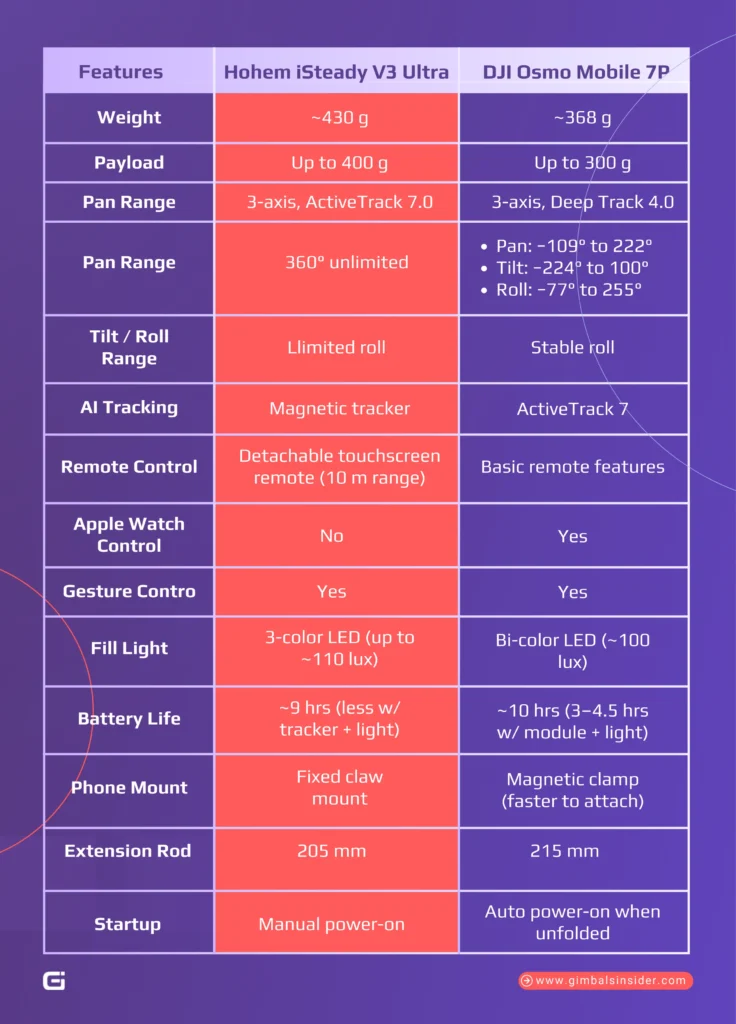
| Features | Hohem iSteady V3 Ultra | DJI Osmo Mobile 7P |
| Weight | ~430 g | ~368 g |
| Payload | Up to 400 g | Up to 300 g |
| Pan Range | 360° unlimited | Pan: −109° to 222°Tilt: −224° to 100°Roll: −77° to 255° |
| Tilt / Roll Range | Llimited roll | Stable roll |
| AI Tracking | Magnetic tracker | ActiveTrack 7 |
| Remote Control | Detachable touchscreen remote (10 m range) | Basic remote features |
| Apple Watch Control | No | Yes |
| Gesture Control | Yes | Yes |
| Fill Light | 3-color LED (up to ~110 lux) | Bi-color LED (~100 lux) |
| Battery Life | ~9 hrs (less w/ tracker + light) | ~10 hrs (3–4.5 hrs w/ module + light) |
| Phone Mount | Fixed claw mount | Magnetic clamp (faster to attach) |
| Extension Rod | 205 mm | 215 mm |
| Startup | Manual power-on | Auto power-on when unfolded |
In-Depth Difference Between Hohem iSteady V3 Ultra vs DJI Osmo Mobile 7P
Let’s get into the detailed Hohem iSteady V3 Ultra vs DJI Osmo Mobile 7P review. Together, we’ll get into the key Hohem iSteady V3 Ultra vs DJI Osmo Mobile 7P specs and see how each one differs.
1. Design
Before you pick a gimbal, you need to know how each one is built and how that design will help or limit you while shooting.
Hohem iSteady V3 Ultra
The Hohem iSteady V3 Ultra folds into a small, clean block with no awkward edges. Since the phone mount is built into the arm, you do need to unfold the entire gimbal before clamping your phone.
Plus, it includes a thin metal tripod, a 205 mm extension rod, and a detachable touchscreen remote that shows a live view from the magnetic AI tracker. This screen lets you frame or lock tracking from a distance.
DJI Osmo Mobile 7P
The DJI Osmo Mobile 7P feels lighter and more traditional to set up. Its magnetic clamp snaps onto your phone quickly and stays locked in place, even with larger devices up to 300 g. Plus, the quick fold-and-open design powers on as soon as you open it.
It’s built-in tripod uses thicker legs that feel more stable, and the 215 mm extension rod gives you extra flexibility with tilt angles. Buttons are also positioned exactly where your fingers land, including the zoom-focus wheel and rear trigger.
In addition, the multifunctional module adds native tracking, gesture control, a fill light, and even works as a mic receiver.
2. Weight and Payload
The weight and payload numbers tell you a lot about how each gimbal behaves once you start shooting.
Hohem iSteady V3 Ultra
The Hohem iSteady V3 Ultra sits at about 430 g, so you’ll feel a bit more weight compared to smaller travel gimbals. The trade-off is worth it because this unit handles a 400 g payload. You add a heavy phone, a rugged case, or even a small lens attachment without stressing the motors.
On top of that, its claw-style mount keeps the whole setup compact and solid.
DJI Osmo Mobile 7P
The DJI Osmo Mobile 7P comes in at around 368 g, so it immediately feels lighter and easier to carry for long recording sessions. It’s 300 g payload still supports most modern devices. However, bigger Pro Max phones with add-ons might get close to the limit.
DJI’s magnetic clamp makes attaching your phone quick and painless. Even with the lighter frame, the OM 7P has strong motors that keep up with fast walking, panning, and quick reframes.
3. Set up and Use Convenience
If you want a gimbal that’s quick to set up, easy to control, and reliable in real-world shoots, these two devices take different paths
Hohem iSteady V3 Ultra
It feels like a tiny all-in-one rig built that comes with a detachable touchscreen remote. With this, you get a live feed from the magnetic AI tracker and lets you reframe or start recording from up to 10 meters away.
In fact, the AI attachment handles people, pets, and object tracking in any app. Hence, you can shoot with your native camera or Instagram without limitations.
However, its setup isn’t instant. You must unfold the body before mounting your phone.
DJI Osmo Mobile 7P
The Osmo Mobile 7P focuses on fast deployment and polished ergonomics. It auto-powers on when unfolded, supports quick-switch modes, and integrates a magnetic clamp that snaps on instantly.
Its ActiveTrack 7.0 locks on fast, even in busy scenes. Most importantly, the multifunctional module adds gesture tracking, a brighter bi-color spotlight, and seamless DJI Mic Mini support.
Beyond that, its side wheel helps you to handle zoom, focus, and lighting.
4. Battery
Battery life decides how long you can stay in creator mode, so it helps to know which gimbal actually lasts when you’re filming nonstop. Here is the quick breakdown you can trust.
Hohem iSteady V3 Ultra
The Hohem iSteady V3 Ultra uses a 1,550 mAh battery that can last up to 9 hours. However, its real usage lands closer to 4-5 hours once the AI tracker and 3-color fill light are active.
Still, the V3 Ultra keeps a steady performance profile even under load, thanks to its efficient iSteady 9.0 stabilisation system. That said, it recharges in about 2.5 hours and supports power bank charging, which helps if you film outdoors.
Meanwhile, the removable touchscreen remote has its own battery. So, it doesn’t drain the main unit when you control the gimbal from a distance.
DJI Osmo Mobile 7P
The DJI Osmo Mobile 7P carries a larger 3,350 mAh battery rated for about 10 hours. Now, that number drops to around 4.5 hours with the multifunctional module, and about 3 hours if the bi-color fill light is also on.
The key advantage is that the OM 7P can charge your phone directly, which makes a big difference during long shoots. It also takes about 2.5 hours to recharge and offers Sleep Mode to stretch battery life during stop-and-go recording days.
5. Working Modes
When you are shooting real content, the gimbal’s modes decide how natural your footage looks. So let’s walk through how each one behaves once you are actually recording and switching angles.
Hohem iSteady V3 Ultra
The iSteady V3 Ultra gives you five core modes —
- Pan Follow (PF)
- Pan-Tilt Follow (PTF)
- POV
- All-Lock
- Sport Mode
All of these are powered by Hohem’s iSteady 9.0 anti-shake system. You can switch modes through the touchscreen or side buttons. Meanwhile, Sport Mode sits behind a simple single-press plus long-press on the trigger.
If you like controlling your framing with the joystick or doing clean subject-tracking shots, the V3 Ultra feels responsive and easy to guide.
DJI Osmo Mobile 7P
The Osmo Mobile 7P keeps things simple with —
- PTF
- PF
- FPV
- SpinShot
You can flip between modes with a quick tap on the M button, and the small display and Mimo app both confirm what mode you are in. Each mode feels predictable, and SpinShot adds an extra creative option when you want a rotating shot.
6. In-App Tracking
If you want the clearest difference between these two gimbals, look at how their tracking behaves once you open the app.
Hohem iSteady V3 Ultra
Inside the Hohem Joy app, you can drag a box around people, pets, vehicles, or objects and let the iSteady 9.0 system follow them. The app gives you creative presets, joystick speed control, panoramas, and time-lapse tools.
Just keep in mind that the in-app tracking doesn’t sync with the multimodal AI tracker. If both are active, framing can jump or drift. The app also limits advanced phone modes like Log HEVC.
In addition, the tilt range stays narrow, so quick low-to-high moves need hand adjustment. For controlled setups, the app works well and gives you clean, predictable tracking.
DJI Osmo Mobile 7P
The DJI Mimo app runs ActiveTrack 7.0, which is fast, sticky, and smooth. You can draw a box on your subject, switch targets instantly, and the gimbal keeps tracking even if the person steps out of frame for a moment.
Most importantly, mimo automatically disables the multifunctional module’s tracking when in use. That way, there is no system clash, and autofocus stays stable.
You also get continuous zoom, SpinShot, and quick mode changes without breaking your shot. If you want reliable, no-fuss tracking inside an app, this is the more polished experience.
7. Fill Lights
Your gimbal’s built-in fill light can be the difference between a grainy clip and a professional reel. Let’s see how these two lights compare.
Hohem iSteady V3 Ultra
This gimbal features a versatile three-colour LED panel. It gives you creative control over the mood. You can switch between warm (2700K), neutral (5000K), and cool (6500K) colour temperatures to match your environment.
Besides, its output is a practical 90 lux, which acts as a soft fill to remove harsh shadows on your face. Plus, you can easily adjust the brightness via a dedicated dial on the gimbal or smoothly control it through the intuitive touchscreen on its detachable remote.
DJI Osmo Mobile 7P
The DJI OM 7 Pro counters with a brighter, bi-colour spotlight rated at 100 lux. Its key advantage is a wider adjustable colour temperature range, from a warm 2500K to a cool 6000K. That way, it offers more flexibility to match various lighting conditions.
You control it directly with buttons on the module itself. Otherwise, you can use the gimbal’s multifunctional adjustment knob for fine-tuned changes.
8. Charging Time
Both brands claim around 2.5 hours to recharge, but the real story shows up once you start filming for long stretches.
Hohem iSteady V3 Ultra
With the iSteady V3 Ultra, you get a built-in 1,550 mAh battery that recharges in about 2.5 hours through USB-C. In perfect conditions, Hohem rates it for long sessions.
However, once you turn on AI tracking and the fill light at the same time, you will see closer to 4 hours of actual runtime.
It also doesn’t quick-start when you unfold it, so you still wait for the full power-up after charging. The upside is that you can plug it into a wall adapter or a power bank, which makes topping up simple when you are out filming.
DJI Osmo Mobile 7P
DJI lists the same 2.5-hour charging time, but the OM7P’s larger 3,350 mAh battery stretches your shoot time more. With the multifunctional module off, you can get up to 10 hours.
Once you attach the module and use its fill light or subject tracking, expect a realistic 4 to 5 hours.
What makes the OM7P handy on long days is that it can also charge your phone through the module’s USB-C port. So if your battery dips mid-shoot, the gimbal doubles as an on-the-go power source.
9. Audio Integrations
They both support solid setups, but they approach audio in very different ways that can shape your workflow.
Hohem iSteady V3 Ultra
What I appreciate about the Hohem iSteady V3 Ultra is how open and flexible it feels. The detachable touchscreen remote acts like your small command panel, and the magnetic AI tracker handles framing. That way, you can stay inside whatever camera app you prefer.
For audio, you aren’t locked into a specific brand. You can plug any wireless mic receiver straight into your phone, and the gimbal won’t interfere with your setup. If you switch between apps or different audio gear, this keeps everything simple, light, and creator-friendly.
DJI Osmo Mobile 7P
DJI takes a more all-in-one approach with the Osmo Mobile 7P. The multifunctional module snaps onto the clamp and immediately works as a mic receiver for DJI Mic Mini transmitters.
I like how fast it pairs, how stable the audio signal is, and that it can even power your phone through its USB-C port. You still get gesture tracking in any app, so you do not have to run Mimo for the module to work.
Once everything is inside the OsmoAudio ecosystem, the 7P turns into a compact audio setup that removes extra cables and decisions for you.
10. Companion Apps
When you’re trying to pick a gimbal, the real separation shows up in their apps. This is where tracking, camera control, and creator tools either speed you up or slow you down.
Hohem iSteady V3 Ultra
With the V3 Ultra, the Hohem Joy app gives you a pretty open workflow. I like that the multimodal AI tracker handles its own tracking on the magnetic module. Thus, you can shoot inside the native camera app, Instagram, TikTok, or anything else without losing subject lock.
In the app, you get tuning controls, joystick speed adjustments, auto-pan, time-lapse tools, and firmware updates. It’s flexible but can get layered quickly. If you turn on both the Hohem Joy tracking and the AI tracker at the same time, the system can fight itself.
DJI Osmo Mobile 7P
DJI Mimo feels cleaner and more predictable the moment you unfold the gimbal. It connects fast and lets ActiveTrack 7.0 take over inside the app. In real use, you get snappy subject reacquisition, gesture triggers, SpinShot, and smooth zoom from 0.5x to 9x.
ShotGuides also helps you learn the controls without digging through menus. For most creators, it feels stable and low friction. Just remember that the advanced tracking only works inside Mimo unless you mount the multifunctional module on the clamp.
Read Related Topic:
Limitations of Hohem iSteady V3 Ultra vs DJI Osmo Mobile 7P
When you are deciding between the Hohem iSteady V3 Ultra and the DJI Osmo Mobile 7P, it helps to look past the glossy feature lists and understand where each one gets in your way.
Here is the clearer, human version of their weak spots so you can choose with confidence.
Hohem iSteady V3 Ultra
Before you get swept up by the V3 Ultra’s remote screen and its AI tracker, you should know the limits you’ll actually feel once you start shooting. These are the real friction points that show up during daily use.
Limitations
- Since there is no detachable clamp, you have to unfold the whole gimbal before attaching your phone. The arm dangles while you set up, which slows you down compared to a magnetic mount.
- You don’t get that instant power-on experience; instead, you need to press and hold the button every time.
- The detachable controller is held by a weak magnet. It can slip out of a bag or pop out when bumped. If you lose it, you lose your joystick and most of the control layout.
- The tilt angle is narrow, and the roll axis can flip the phone when you angle the handle to your left side.
- The 1.22-inch screen shows the AI module’s feed, not your camera feed. At higher zoom levels or in portrait mode, the preview becomes misleading.
- The touchscreen is small and not bright enough in strong daylight, so remote framing becomes guesswork.
- Even though the AI tracker is rated for 7 meters, selecting a subject on the small screen is only realistic at around 2 meters.
DJI Osmo Mobile 7P
The OM 7P feels more refined out of the box, but it still carries its own set of limitations. These show up when you film long sessions, rely on third-party apps, or push the gimbal for creative camera moves.
Limitations
- The gimbal stops at hard limits. If you want full rotation or orbit shots, this will break the move.
- Its multifunctional module is useful, but it makes the clamp bulkier and shifts the balance slightly.
- The gimbal’s rated 10 hours drops to roughly 3 hours when the fill light and tracking are active at the same time.
- Low-angle filming is tight unless you extend the rod and manually re-level the pan motor.
- One bump can change your zoom or switch lenses, which can ruin a take.
- The gimbal doesn’t respond immediately after unfolding. Using Sleep Mode helps, but it is still slower compared to instant power-on systems.
- When you activate SpinShot, ActiveTrack 7 turns off. You cannot combine rotation effects with subject tracking.
- Some apps do not support the DJI Mic Mini over Bluetooth, so you may need to use the module’s wired connection.
- On 0.5x lenses, part of the gimbal can creep into your shot unless you reposition the clamp perfectly.
- The module can track without the Mimo app, but you cannot see what it is locking onto. You only rely on gesture confirmation.
Hohem iSteady V3 Ultra vs DJI Osmo Mobile 7P: Which Is Better?
If you walk, pivot, climb stairs, or grab quick 60fps clips, the DJI Osmo Mobile 7P will feel more stable in your hand. Its 3-axis motors stay firmer during fast direction changes, and ActiveTrack 7 works inside any app you already use, including your native camera.
But if you record yourself often or need the gimbal to follow you without touching your phone, the Hohem iSteady V3 Ultra makes life easier. Its 360° panning, 400 g payload, and touchscreen remote let you frame yourself, adjust the gimbal, and track people, pets, or objects without jumping into an app.
Final Words
When you look at the Hohem iSteady V3 Ultra vs DJI Osmo Mobile 7P, it really depends on how you like to shoot.
If you record yourself often, use heavier phones, or want hands-free framing through a remote and full 360 pan, the Hohem makes the workflow easier. Again, if you want a quick setup, tight tracking inside the app, and smooth footage while you walk or move fast, the DJI will feel natural to you.
Both have drawbacks, but each one solves a different problem.


Leave A Reply
Comment submitted successfully!